Everything you need. Right on top.
Each card does one job well. These are real screenshots of KOL, with made-up names.
Sound, under control
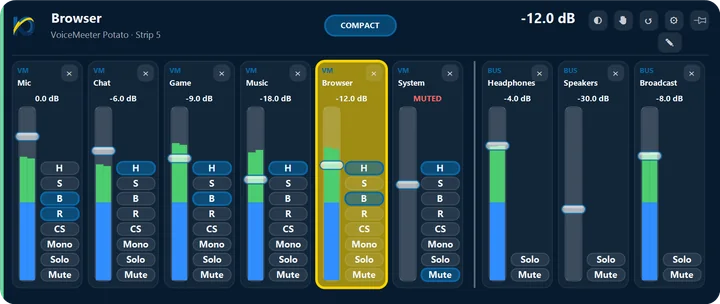
Every app, microphone and speaker on one card, with live levels. Open a compact card for one channel or the full mixer for all of them.
- Mute, solo, mono and outputs in one click
- Link channels so volume and mute move together
- Mutes the mic after you step away, only if you want
- Works with a game controller

Now playing, everywhere
KOL plays along with whatever is already playing on your PC, and shows the words in time with the song.
- Seek, skip and jump ten seconds
- Karaoke-style lyrics, Hebrew read right to left
- Signed in to your own music account, with playlists, liked songs and queue
- Back on the same song after a restart
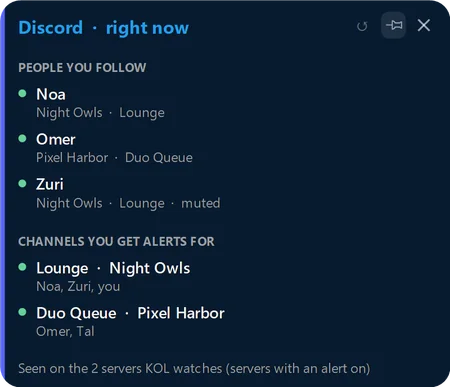

Conversations on top
Messages and calls from the chat apps you already use arrive on small cards over whatever you are doing.
- Read and reply right from the card
- Answer or decline a call without leaving the game
- See which of the people you follow are in a Discord voice channel
- Nothing is sent unless you send it
- Never rings out loud on its own


ScratchPad and Clipboard
A note, a to-do or a quick sum with Ctrl+Alt+J, and the last texts you copied one click away.
- Notes and to-dos are saved as plain files in your own folder
- The Clipboard card is off until you turn it on, and never reads what a password manager marks private
- Web card: a small browser for any website, with Ctrl+Alt+B

Any part of the screen, live
Press Ctrl+Alt+A and drag around part of the screen or a window. It stays live on a card of its own, square or round, even when you minimize that window.
- Freeze a card to keep a still picture
- Never takes the keyboard from a full-screen game or video
Make it yours
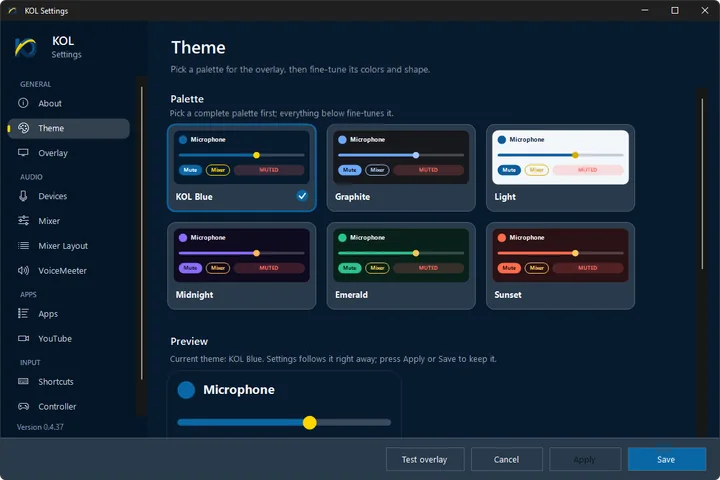
Six themes, then every detail: colours, transparency, corner roundness and your own shortcuts.
- Live preview while you choose
- Drag any card anywhere; it remembers its place
- Settings, cards and menus in English and Hebrew; the setup guide is in English for now
Stays out of the way
Light in the background and steady when something goes wrong.
- KOL's background helpers restart themselves if they stop
- Your cards come back after a restart
- Settings are backed up automatically
- Tested with games like Fortnite, FIFA and Roblox, with no anti-cheat issues

Never stop what you're doing.
One shortcut and KOL is there. One more and you're right back where you were.
Open to beta testers for now · available to everyone in the coming days
Beta testers: on the page that opens, click “Show in Microsoft Store app”, signed in with your invited Microsoft account.
On Windows the button opens the Microsoft Store app. Sign in there with your invited Microsoft account.
Not a beta tester yet? Write to us to join, or ask us to tell you when it's public.
Windows 10 (version 1809 or newer) or Windows 11 · Free beta