A volume mixer overlay for Windows gamesKOL — Katam's Overlay
Your teammates are too loud, the music drowns out the footsteps, and the Windows volume mixer is three clicks away behind the game. KOL puts a volume mixer right on top of your game, so you fix the sound and keep playing.
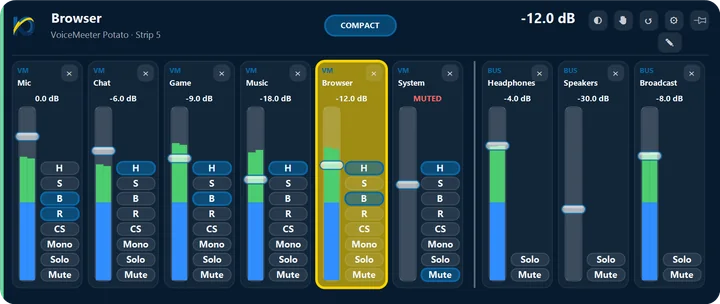
Press one shortcut and a small card shows the channel you care about. One more click opens the full Mixer: every app, microphone and speaker side by side, with live levels.
Every app on its own fader
Set the game, your voice chat, the browser and your music each to its own level. Drag a fader or use the mouse wheel; a double-click puts an app back to 100%.
- Mute or solo a channel in one click
- Link channels so volume and mute move together
- Live levels show what is really making the noise
- Muting an app mutes it on every device it plays to
Made to stay out of your game
KOL's cards are ordinary windows on top. They never take the keyboard from your game, so the keys you press still go where you are playing.
- Opens with one shortcut, Alt+~ unless you choose another
- Works with an Xbox-compatible controller or a DualSense
- A small card shows MUTED or Mic ON, and can stay on screen
- Mutes the mic after you step away, only if you want
Start in three steps
- Get KOL from the Microsoft Store. It's a free beta for Windows 10 and 11, open to beta testers for now.
- Run the short setup. It lists your sound devices and apps, and asks which keys you want for volume and mute.
- Press Alt+~ in your game. The sound card opens on top. Press MIXER to see every channel at once.
Good to know
- The cards show over borderless and windowed games and over full-screen videos. Over a game in exclusive full screen we can't promise it, because Windows decides what shows there; most games have a borderless option.
- KOL works with Windows' own sound. VoiceMeeter is optional and adds its strips and outputs.
- Tested on a second PC with games like Fortnite, FIFA and Roblox, with no anti-cheat issues. That is a test result, not a promise.
Questions
Can I change one app's volume without alt-tabbing?
Yes. KOL's cards sit on top of the game. Press Alt+~, click MIXER, move the app's fader and go back to playing. The game keeps the keyboard the whole time.
Does it work with a controller?
Yes, with up to four Xbox-compatible controllers, and with a DualSense or DualSense Edge. While the sound card or the Mixer is on screen, the D-pad changes channel and volume and the X button mutes. You can set your own buttons.
Will it show over my full-screen game?
Over borderless and windowed games, yes. In exclusive full screen Windows decides what can show on top, so we can't promise it there. Switching the game to borderless in its display settings fixes that.
How much does it cost?
KOL is a free beta. No account and no ads.

Never stop what you're doing.
One shortcut and KOL is there. One more and you're right back where you were.
Open to beta testers for now · available to everyone in the coming days
Beta testers: on the page that opens, click “Show in Microsoft Store app”, signed in with your invited Microsoft account.
On Windows the button opens the Microsoft Store app. Sign in there with your invited Microsoft account.
Not a beta tester yet? Write to us to join, or ask us to tell you when it's public.
Windows 10 (version 1809 or newer) or Windows 11 · Free beta