WhatsApp and Discord messages over full-screen gamesKOL — Katam's Overlay
A message comes in mid-match. You can alt-tab out and lose the round, or ignore it and wonder. KOL gives you a third way: the message shows on a small card over the game, and you can answer it right there.
Both are optional and stay off until you set them up. KOL runs its own copy of WhatsApp Web and of Discord's website on your PC, and you sign in to them yourself.

WhatsApp chats and calls
Pick the chats you want to watch. Each one gets a card with its latest messages, and you reply from the card.
- Find any chat, or start a new one, without leaving the game
- An emoji picker, and colour emoji on the cards
- Voice messages, photos and videos are named on the card, so you know what arrived
- Answer or decline a call from a card; your PC never rings out loud
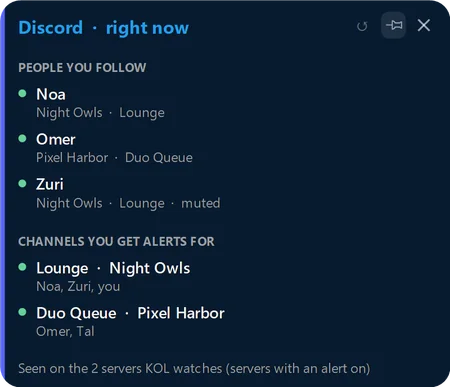
Discord voice and messages
Who's on shows which of the people you follow are in a voice channel, muted or not. Follow channels and DMs, and reply from a card.
- Alerts when someone joins or leaves, everywhere, in one server or in one channel
- Chat cards come back after a restart, where you left them
- Hide anyone you don't want to see
- Calls stay in the Discord app; KOL doesn't join them
Start in three steps
- Get KOL from the Microsoft Store. It's a free beta for Windows 10 and 11, open to beta testers for now.
- Turn on WhatsApp or Discord in Settings. Link WhatsApp by scanning a QR code with your phone, or log in to Discord as you would on another device.
- Choose the chats and channels to watch. New messages show on a card over your game.
Good to know
- The cards show over borderless and windowed games and over full-screen videos. Over a game in exclusive full screen we can't promise it, because Windows decides what shows there; most games have a borderless option.
- Replies are text and emoji. Photos and voice messages are named on the card, not shown or played there.
- Gaming mode, in KOL's tray menu, hides call cards, so calls ring only on your phone.
- Both are still new in KOL and marked experimental in Settings.
Questions
Is this a Discord bot?
No. KOL runs Discord's own website on your PC, logged in by you, like another device. There is no bot and nothing to add to a server.
Do I need WhatsApp Desktop?
No. KOL links its own WhatsApp Web once, with a QR code. If you use WhatsApp Desktop, it keeps working next to it.
Will a card take focus from my game?
No. The cards never take the keyboard from a game. Click a card when you want to type a reply.
Does KOL read or keep my messages?
It reads the chats you chose, on your PC only, to show them. KOL doesn't save message text or send it anywhere, and nothing is sent unless you send it. The privacy policy has the details.

Never stop what you're doing.
One shortcut and KOL is there. One more and you're right back where you were.
Open to beta testers for now · available to everyone in the coming days
Beta testers: on the page that opens, click “Show in Microsoft Store app”, signed in with your invited Microsoft account.
On Windows the button opens the Microsoft Store app. Sign in there with your invited Microsoft account.
Not a beta tester yet? Write to us to join, or ask us to tell you when it's public.
Windows 10 (version 1809 or newer) or Windows 11 · Free beta